How to install Official Jelly Bean 4.1.2 on Galaxy S2

Posted by Unknown Selasa, 18 Juni 2013 0 komentar
Galaxy S2 GT-I9100 recently received its latest Jelly Bean Over-The-Air (OTA) update from Samsung via Android 4.1.2 VJMS4 official firmware. The firmware is currently available for download as OTA update as well as through Samsung KIES in select countries including Brazil.
However, those who missed the twin opportunities and those residing outside the supported countries can still download and install the same manually (provided the device is unlocked), using our step-by-step guide. NOTE: The installation of this OTA update does not require ClockworkMod recovery (CWM) or a rooted Galaxy S2 phone, as it can be installed manually via ODIN flash tool.
Android 4.1.2 VJMS4 Jelly Bean Official Firmware
PDA: I9100VJMS4
CSC: I9100ZTAMS4
Version: 4.1.2
Date: May, 2013

Key Points:
  • Back up your data, messages, contacts etc.
  • Enable USB Debugging
  • Do not try to install this firmware on any other model except Galaxy S II i9100.
  • Your phone should be charged above 70%.
  • Do not try to install from computer running Linux or Mac OS.
Downloads
How to Update Galaxy S2 GT-I9100 on Official Android 4.1.2 VJMS4 Jelly Bean Firmware
Galaxy S2 I9100 Receives Official Android 4.1.2 VJMS4 Jelly Bean OTA Update
Step 1: Extract the firmware zip file to the desktop to get a .tar.md5 file and some other files (optional).
Step 2: Extract Odin zip file to obtain Odin3 v3.07.exe along with few other files.
Step 3Power off the phone and wait for vibration (about 5-6 seconds) to confirm complete device shutdown. Now boot the phone into Download Mode by pressing and holding Volume DownHome and Power button together until a construction Android robot icon with a triangle appears on screen. Then hit Volume Up button to enter Download Mode.
Step 4: Launch Odin3 v3.07.exe that you obtained in Step 2 as an Administrator, as Admin privileges are required to complete the firmware installation process smoothly.
Step 5: Connect your phone to computer via USB cable. When the device connects successfully, the message saying "Added!" appears in ODIN and the ID: COM box will turn yellow with the corresponding COM port number. If the message fails to appear, try reinstalling the phone's USB drivers or changing the port on the computer.
Step 6: Choose the following files from I9100VJMS4 folder that you obtained in Step 1 in Odin using respective checkboxes:
  • Select the PDA checkbox, and click the .tar.md5 file
  • Tap the Phone checkbox, and select the file named 'modem' (ignore if such file is not found)
  • Choose the CSC checkbox, and click the file named 'CSC' (ignore if there is no such file)
  • Click the PIT checkbox, and choose the '.pit' file (ignore if the file is missing)
Step 7: In Odin, enable Auto Reboot and F. Reset Time options by selecting the checkboxes. But the Re-Partition checkbox must be selected only if a .pit file was chosen in the previous step in ODIN.
Step 8: To prevent ROM related errors, verify Step 6 and Step 7 are done correctly. Then hit the START button to begin flashing the firmware.
Step 9: Once the firmware installation is complete, the phone will reboot automatically and soon a PASS message with green background appears in the left-most box at the very top of Odin. Now it is safe to disconnect the USB cable to remove the device from computer.
The Galaxy S2 GT-I9100 is now running on the latest Android 4.1.2 VJMS4 Jelly Bean OTA firmware. Go to Settings > About Phone to verify the firmware installed.
Troubleshooting:
If the phone is stuck at boot animation or Samsung logo after Step 9, then go torecovery mode (press and hold the Volume Up, Home and Power buttons together) and perform Wipe data/Factory Reset as well as Wipe Cache Partition before choosing reboot system now option. Use Volume keys to navigate between options and Power key to select an option in recovery. Please note that performing data wipe task will only erase your phone's internal memory and not the data on SD card.
[Source: Droid Firmwares]

Baca Selengkapnya ....

MacBook Air: Better Battery Life, But No Retina Display

Posted by Unknown Minggu, 16 Juni 2013 0 komentar
All the power you want all day long…but no Retina display!
The new MacBook Air has finally arrived with an incredible change to battery life thanks to the new fourth generation Intel Haswell processor, however, we will still have to wait for the Retina display upgrade.
All of Apple‘s other high end devices (the iPhone 5, the MacBook Pro and the iPod touch) all have the Retina display, so why can’t  we have this wondrous visual feast in the new MacBook Air?  Well it all comes down to this: with the new Haswell chip installed, it was a trade off between extended battery life and the Retina display.  The battery life won, hands down, with the new processor on board, the focus was on battery longevity.  And with such a fantastic display anyway, do you care? The 11-inch MacBook Air’s display measures a mere 4.86 millimetres thin and features a resolution of 1366×768 pixels, while the 13-inch model has a resolution of 1440×900 pixels!  Both sizes have LED backlighting which makes colours bright and vibrant from all viewing angles. The Air comes with a 720p FaceTime HD Camera with Dual microphones and these microphones reduce background noise from behind the notebook, which is useful, say, when you use dictation software as they create an adaptive audio beam that intelligently adjusts to detect your voice, instead of the noise around you.
macbook air
This new machine is powered by the all-new fourth-generation Intel Core i5 and i7 processors with ultra efficient architecture, which was designed to use less power and still deliver high performance (this is where your extended battery life comes in) If you put the MacBook Air to sleep for more than 3 hours it enters standby mode to conserve battery life, for up to 30 days and if you enable the Power Nap feature, you’ll continue to receive new email and calendar invitations while your computer is asleep!
Even Faster WiFi
The MacBook Air now supports ultra-fast 802.11ac Wi-Fi. When connected to an 802.11ac basestation which includes the new AirPort Extreme and AirPort Time Capsule.
Apple say wireless performance is up to 3x faster than with the previous generation of MacBook Airand your Wi-Fi range improves as well. With Bluetooth technology installed you can connect MacBook Air to Bluetooth-enabled devices.
It’s all about the Flash!
The MacBook Air is designed entirely around flash storage. Not only does this make this notebook much lighter and more portable than traditional notebooks, it also provides a faster access to data and this latest machine comes in capacities up to 512GB.  This next-generation flash storage is up to a staggering 9x faster than a traditional 5400-rpm notebook hard drive. And it’s up to 45% faster than the flash storage in the previous-generation MacBook Air! The 11-inch model now comes as standard with 128GB of storage.  In addition, the new Intel HD Graphics 5000 chip offers up to a massive 40 per cent faster graphics power!
The MacBook Air also comes equipped with a lightning-fast Thunderbolt port and two USB 3 ports, so you can connect the latest USB 3 devices and all your USB 2 devices as well.
So, with an amazing battery life, a new generation processor, a super fast flash HDD, great sound and speakers, Thunderbolt and USB3 connectivity and a crystal clear display (oh and it’s light as a feather!), do you really care that it doesn’t have a Retina display?  I don’t.
The new MacBook Air range is priced at 11-inch from £849 and 13-inch from £949 and are available online and instore now.
[Image via simpymac]

Baca Selengkapnya ....

Hashtag in Facebook

Posted by Unknown 0 komentar
The “hashtag”, which has come to be synonymous with Twitter, is to be adopted by Facebook according to an announcement on Wednesday.
Facebook will be rolling out this new feature in a move to help its users and advertisers channel discussions around specific events and topics.
The “hashtag” feature encourages users to open their conversations with people who are not necessarily classes as “friends” on Facebook. This should encourage more revenue.
Justin Osofsky, director, platform partnerships and operations at Facebook said in a blog posted on Wednesday, “Between 88 and 100 million Americans log in to Facebook every night during prime time TV hours, which represents a significant opportunity for broadcasters, advertisers and our other partners. A recent episode of the Game of Thrones series on HBO generated 1.5 million mentions on Facebook”.
hashtag facebook
In a seperate blog Facebook said, “To date, there has not been a simple way to see the larger view of what’s happening or what people are talking about. To bring these conversations more to the forefront, we will be rolling out a series of features that surface some of the interesting discussions people are having about public events, people, and topics. As a first step, we are beginning to roll out hashtags on Facebook.”
Currently Facebook users can control their settings, meaning that they can set their posts to be seen only by friends. This is different to Twitter, where tweets are public and viewable to all users. Facebook have stated that their same control settings will apply to the new hashtag feature as well, the users can decide whether to make their hashtags viewable by their friends only, or share individual posts with a wider circle of users.
The hashtag feature will be available to roughly 20 percent of users initially, while everyone else can expect to see it over the coming weeks. It will be interesting to see if it is as popular on Facebook as it is for their rival Twitter.
[Image via universalsportmags]

Baca Selengkapnya ....

Android App "Justin tv's" lets you broadcast live video Anytime, Anywhere

Posted by Unknown Jumat, 14 Juni 2013 0 komentar
Imagine streaming video from your Android phone to the web at the click of a button — no Wi-Fi needed, no painful upload times, no maneuvering back and forth between a handful of apps to shoot and share your video. Today, Justin.tv is making all that possible.
Its Android app is available for download right now (an iPhone app is in the works) and lets users stream live video recorded on their Android devices directly to the Justin.tv website. Facebook and Twitter sharing are built in (and opt-in for each video). The app works great on a 3G connection, so you won't have to wait for Wi-Fi to get your videos live online.
Each video that you stream will be recorded and saved forever at the same URL as your live broadcast, and the video is live and saved online as soon as you hit the app's red recording button, regardless of what might happen to you or your device during the shoot.
The app's creators see it as a great tool for average users who want to be able to take the power of mobile video with them anywhere they go and upload that video at any time. The Justin.tv team imagines this app will be used, for example, for recording your child's first steps as much as recording a political protest.
Finally, the team focused a lot on quality and framerate. Even if you migrate into a lower-quality connection during recording, though the quality may decrease, the framerate will remain smooth. And once you're back to a strong connection, the video quality will increase again.
Here's a sample video we shot in our San Francisco office with a Motorola Droid:


The app is a breeze to use compared to other products in the same space. The videos are better, the interface is more stable, sharing is simpler. Although Justin.tv may not have been the first player in the live-video-from-mobile game, in our opinion and experience, its product is still the best available to consumers right now.

If you're ready to start playing with the app, go download it here, or just use this handy QR code:

What do you think of the new Justin.tv app? Let us know in the comments.

Baca Selengkapnya ....

China Unveils World’s Fastest Supercomputer

Posted by Unknown 0 komentar
China has scored a win in the race to achieve mega computing power, by unveiling a new system that is twice as faster than anything else available right now.
Tianhe-2  was unveiled at the end of last month by the Chinese National University of Defense Technology. At an operating speed of 30.7 petaflops or quadrillion operations per second, it is definitely the world’s fastest supercomputer right now.
China Unveils World’s Fastest Supercomputer
Also known as Milkyway-2, the supercomputer is more than likely to top the biannual Top 500 supercomputer list out this month. The first place in the ranking is currently held by U.S. system Titan, at the Oak Ridge National Laboratory. For comparison, Titan, owned by the U.S. Department of Energy, operates at just 17.6 petaflops per second.
China already topped the supercomputer ranking in 2010, but was beaten by Germany in 2011 and then the United States last year. A senior Oak Ridge National Laboratory researcher and Tennessee University professor, Jack Dongarra, was able to see Tianhe-2 in operation and confirmed the statistics revealed.
What’s interesting is that the Chinese system operated at 30.7 petaflops per second in a Linpak test of only 90 percent of its capacity, so it is likely to score more when it runs 100%. Dongarra said in a report that the system’s theoretical performance is estimated at 54.9 petaflops.
Technical specs 
The world’s fastest supercomputer is equipped with 2 different kinds of Intel computer chips and locally-developed circuitry. It reportedly has 12.4 petabytes (1 petabyte equals 1,000 terabytes) of storage and 1.4 petabyte memory.
Its operating system, Kylin Linux, was especially developed by the National University for Defense Technology. The machine is housed in a large room and is equipped with 48,000 Xeon Phi boards and 32,000 Intel Ivy Bridge Xeon sockets, Dongarra said.
Tianhe-2 will be moved to the China’s National Supercomputer Center to provide a high-performance, open computing services for the southwest of the country. Among possible uses for the system is running simulations for airplane testing, aiding government security and processing what was described as “big data.”
[Image via datacenterjournal]

Baca Selengkapnya ....

Wifi Hotspot in Windows 8

Posted by Unknown 0 komentar
Having an Internet connection wherever you go is a huge advantage. Many people carry devices that keep them connected to the Internet while they are on the move or when they are traveling and stopping over at different destinations. Usually, hotels that you stay at will have Internet facilities for you which is a great convenience.
No matter what operating system you use and no matter what device you use, you will always expect the best and most efficient service to support your needs. However, the disappointing part is that wherever you stopover, you almost bound to get per-device service.
Users Can Now Have a Wi-Fi Hotspot in Windows 8
This means that you can only get your laptop online, and if you want to access your phone and your tablet, you’d need to obtain separate connections for them. This means that you have to pay more for the extra connections.
Create a Wi-Fi Hotspot in Windows 8 by Using Virtual Router Plus (VRP)
Thanks to Windows, you can access all your devices on one connection. All new versions of Windows should be able to offer a Wi-Fi hotspot through which you can do this. Windows 7 did it, but you can’t do it with Windows 8. However, the capability still exists in Windows 8, but it requires some intense command-line adjustment.
With a helpful component known as the Virtual Router Plus (VRP), you can manage this. VRP is a free utility that is used for adding on Wi-Fi hotspot capabilities. This really works, but you need to do a few more things.
To start with, you need to exercise great caution when setting this up. While the software is free, you might get a whole lot of unwanted junkware. If you remain alert at each stage of the setup, you can avoid these unwanted components.
Initiating and Progressing through Setting up Virtual Router Plus (VRP)
When you encounter the first screen, select Custom Installation, and then uncheck the box located just under that. When you move to the next frame, you will see a pop-up, which will do you no favors. Just cancel it and move on by clicking Next. You will encounter another checkbox that you need to clear. After this, you will be able to install the software.
When you initiate the program and it begins to run, a Help page will automatically run in your browser. You may need this page in order to verify whether or not you have all the drivers you need. You can skip this part for now, as the software will run on its own any way.
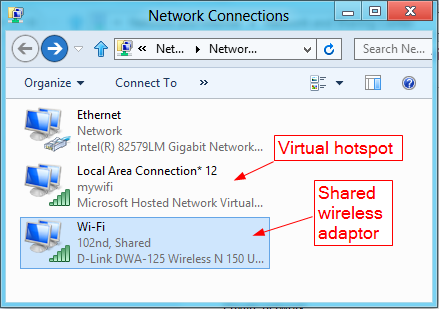
To start running the program, you will need to name your WLAN (i.e. SSID), followed by a password in order to keep out intruders. Now, you need to select a connection that you want to share. Normally, you would choose anything that you have as a default. Once you’re done with that, just click Start Virtual Router Plus.
Users Can Now Have a Wi-Fi Hotspot in Windows 8
In a few moments, you will be connected to your new network through your tablet, phone or another computer. Your laptop will have its own connection going without any interruption.
[Images via truconnect & nextofwindows]

Baca Selengkapnya ....

Samsung Galaxy S4 Zoom is Coming

Posted by Unknown Kamis, 13 Juni 2013 0 komentar
Samsung never stop its step of creation, after punlishing the new flagship smartphone-Samsung Galaxy S4, Samsung releases the new that a revolutionary product will be published in few month. Samsung Galaxy S4 Zoom which combine the feature of digital camera and smartphone. Compared wtih Samsung Galaxy Camera, Samsung Galaxy S4 is more powerful and small, and its technology is more mature. Based on the news released by Samsung, we can have a look for Samsung Galaxy S4 Zoom. The Samsung Galaxy S4 Zoom is a combination of smartphone and digital camera. Properly speaking, it is a smartphone which is equipped a camera shot. This phone is about 15.4mm thick and weights 200 gram, as a camera phone, Samsung Galaxy S4 Zoom has a slim body. Although the precise released date and price are still unkown, but we can learn something about this Camera Phone's configuration.

samsung galaxy camera photo recovery

Camera Hardware

As a camera phone, the capacity of photography must the first thing considered. Samsung Galaxy S4 Zoom has a CMPOS sensor with 16 megapixels, which allow user take photos with a xenon flash and a 10x optical zoom lens. Besides, with the help of an optical image stabilizer for movement, blurriness in photos can be reduced when user is taking photos. The most exiting point of this phone is that the lens (ISO, Focal Length, Aperture) are on par with most general digital cameras. On the other hands, the front camera is good as well, user can have a good experience of video chat.

Internal Hardware

When it comes to smartphone, we all will focus on its hardware configuration. And we don't worry about the hardware of Samsung Galaxy S4 Zoom. As a family member of Samsung Galaxy, the Samsung Galaxy S4 Zoom is equipped powerful hardware configuration. It's 4.3 inches tall and has a 960 x 540 resolution. Of course, Samsung S4 Zoom has equipped the with AMOLED technlogy which is the selling point of Samsung smartphone and provides good colour and contrast. In addition, the dual-core processor is clocked at 1.5 GHz with 1.5 GB of RAM inside which provides sufficient power to operate the system. The battery also comes pretty well equipped at 2330 mAh and internal storage is set at 8GB (with microSD expansion possible up to 64GB).


samsung galaxy S4 zoom

Operation System

Android will be indispensable in Samsung Galaxy phone, Samsung Galaxy S4 Zoom install Android 4.2 Jellybean, which is customized as Samsung's Touchwiz. We can predict that it comes with some special functions which has existed in Samsung Galaxy S4, such as S Voice (voice assistant software) and S Translator (translation software). Besides, as a camera phone, Samsung will add some photo software to this phone for strengthen its capacity of photography.

Communication Feature

Compared with its elder brother-Samsung Galaxy Camera, Samsung Galaxy S4 Zoom can make call and be used as a smartphone. It support Micro-sim card and allows to acess GSM,EDGE, HSPA, and even LTE. Of course, Wi-Fi and Bluetooth 4.0 will be on board as well.

Spec overview

 Display
 4.3 inches, AMOLED, 960 x 540 pixels

 Rear camera
 16 megapixels, 10x optical zoom, optical image stabilizer, focal length of 24-240 mm, F3.1-F6.3 aperture, ISO up to 3200, video recording: 1920 x 1080 pixels
 Front camera
 1.9 megapixels
 CPU
 1.5 GHz, dual-core, 1.5 GB RAM
 Connectivity
 GSM, EDGE, HSPA + (up to 21 Mbit / s), Cat 3 LTE (up to 100 Mbit / s), Wireless N (5GHz), Bluetooth 4.0
 Memory
 8 GB, microSD up to 64 GB
 Size and Weight
 25.5 x 63.5 x 15.4 mm, 204 grams
 Battery
 2,330 mAh


You can learn more about Samsung Galaxy Camera Photo Recovery from here : http://www.card-data-recovery.com/recover-deleted-photos-videos-from-samsung-galaxy-camera.html

Baca Selengkapnya ....
Trik SEO Terbaru support Online Shop Baju Wanita - Original design by Bamz | Copyright of android gingerbread.