Virtual Game Teaches Visually Impaired To Navigate Surroundings

Posted by Unknown Rabu, 10 April 2013 0 komentar
Dr. Lotfi Merabet and Researchers in the Department of Ophthalmology at Massachusetts Eye and Ear Infirmary along with Harvard Medical School have recently developed a virtual game environmentin which visually impaired individuals can develop a mental map of unfamiliar surroundings. On March 27th, Dr. Merabet published a new video article explaining how the game works to build navigation skills in the visually impaired.
Dr. Merabet speaks of the difficulty experienced by the blind and visually impaired when trying to find their way around unfamiliar territory. Merabet explains, “For the blind, finding your way or navigating in a place that is unfamiliar presents a real challenge. As people with sight, we can capture sensory information through our eyes about our surroundings. For the blind that is a real challenge… the blind will typically use auditory and tactile cues.”
How it works
The game uses computer generated layouts of public buildings along with spatial sensory feedback to create a virtual space that mimics a real life journey through the territory. The goal of the game is for players to find their way through the space and retrieve gems, taking them safely outside of the building without getting caught by roaming monsters.
Participants explore the virtual buildings with the use of a keyboard for movement and headphones that give the user auditory cues to help them orientate themselves with the surrounding space. After some repetition the user will develop an understanding and mental map of the space. Dr. Merabet and his team of developers are also working towards using this technology in other user interfaces, for example, instead of using a keyboard, the game may eventually be playable with a Wii remote or a joystick.


Baca Selengkapnya ....

People finds hard to repair HTC One

Posted by Unknown 0 komentar
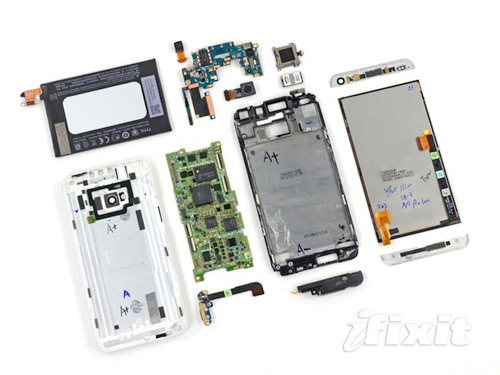
The HTC One has earned the dubious honor of becoming iFixit’s first ever smartphone to receive a repairability score of 1 out of 10.
HTC delayed its 2013 flagship phone by more than a month due to parts shortages and yield issues, now the company gets to deal with design issues.
The repairability score was given because the HTC One’s seamless, screwless design, makes it nearly impossible to remove the smartphones display without damaging the rear case. However, the display must be removed to gain access to the phones internals.
HTC_One_360_Wide
iFixit discovered that the zero-gap design could only be pried open with a heat gun and a suction cup. After opening the main design the team spent half an hour separating the rear aluminum case from the other functional components of the phone.
The team at iFixit tears down a lot of devices and rarely damages them. In this case it was a plastic panel surrounding the smartphones aluminum case that fell apart.
Once inside the smartphone the team finally had access to the devices component. The HTC One actually houses some really nice offerings including the Snapdragon 600 CPU that has been paired with Elpida DDR2 RAM and 32GB Samsung NAND flash memory. The HTC One also packs in a Wi-Fi 802.11ac adapter and Bluetooth 4.0 alongside a rather larger 2300 mAh battery.
Most smartphone customers would never attempt to take apart their own HTC One to fix issues they have perceived, however the poor repairability score means HTC could be forced to outright replace broken phones.
HTC isn’t alone in its low score, Apple devices have previously scored low marks through the iFixit process because of glue use in their design and other issues with smartphone and tablet builds.
One constant does seem to remain, when a smartphone receives a low repairability score it is often because the phone was built for durability while packing in a lot of features users want.
Will a 1 out of 10 repairability score for the HTC One scare you away from the smartphone?
HTC One
 

Baca Selengkapnya ....

Rovio’s ‘Angry Birds Friends’ Comes To IOS & Android

Posted by Unknown 0 komentar
 
Rovio on Wednesday announced plans to take its Angry Birds Friends game from Facebook to Android and iOS devices. The announcement marks the first time that Rovio has created a game for Facebook first and then moved it to mobile devices.
Angry Birds Friends has picked up 60 million installs since it debuted on Facebook. The game currently includes more than 15 million monthly active users via the Facebook desktop platform.
Rovio made the announcement during a Facebook mobile event in Helsinki.
The Angry Birds and Bad Piggies developer made the announcement on the same day it announced $195 million in revenues. That revenue shows that 45% of the company’s money is now coming from Rovio’s non-gaming business, specifically revenue from the sale of various merchandising.
The move to take Angry Birds Friends from the Facebook platform to mobile devices matches a recent trend in which the most popular online games are moved to a “free-to-download” model. The idea behind the shift is that users will be more willing to buy in-app purchases on mobile devices.
Facebook Gaming partnerships head Julien Codornoiu tells TechCrunch:

“Rovio I think is very inspired by Supercell, which is absoutely ruling the App Store when it comes to top grossing apps. No one caares about paid as much as they do about grossing.”

Rovio received a lot of attention from Facebook in 2012 with the networks top three games all arriving by way of Angry Birds editions.
It was only 18 months ago that Rovio finally embraced social gaming, launching its first ever Facebook title. Attracting Facebook gamers has never been more important. The social network recently announced that more than 250 million monthly gamers now call the social network home. Moving to social gaming became easier after Facebook and Words With Friends developer Zynga severed their long-standing exclusivity contract.
Are you excited by the move of Angry Birds Friends to the iOS and Android platforms?


Baca Selengkapnya ....

Samsung Galaxy Camera Failed-How to Fix Camera Failed Error on Samsung Galaxy

Posted by Unknown Selasa, 09 April 2013 0 komentar
Samsung galaxy camera failed error on S3
Black screen and says warning camera failed when I turn the samsung galaxy camera. Camera failed. Starting camera, nothing happens, freeze. No help from several reboot or several factory data reset or just from several reset. Still gives error message (like you see on picture). Any other recommendations how to fix this error?

Generally speaking, one of the four ways below could solve the Samsung galaxy s camera failed error.


Way one
The taking photos are stored in the memory card, maybe something wrong happen on the storage, so try to format memory card.
Please Note: formatting memory card will cause data loss, before you do that, please backup important files. Don’t panics if you forgot to make a backup, Tenorshare Photo Recovery is the simple way help to recover lost data.

Way two
The old firmware on your current phone may have bugs, and then just need to update your phone to new firmware to see if it can help samsung galaxy s3 camera failed

Way three
Disable the Location option in your Samsung Galaxy.

Way four
Factory reset is the all purpose way to solve phone software problem.

Fix samsung galaxy camera failed error unsuccessful with four ways above?  Here is a method as most people have had success with it.
Step 1 Go into Settings, and choose Applications.

Step 2 Choose Running Services from the Applications menu.

Step 3 Press the Menu key to show the option Show cached processes when shown the list of Running services, select Show cached processes.

Step 4 Scrolling through the list of cached processes look for the Camera app and select it.

Step 5 You will have the option to Stop it when you select the Camera process.  Choosing Stop should successfully release the camera hardware.


Return to your home screen after stopping the cached camera process and try relaunching the camera program or whatever other program you were trying to run when you ran into the “Camera Failed” error message.

In my experience this methods have been as good and many times for camera failed samsung galaxy s error. Not only work on S3, but also work for samsung galaxy s2 camera failed and more Samsung galaxy versions.

Any question about Samsung Galaxy recovery? Please leave your comments!

Baca Selengkapnya ....

Updated Sfiras HaOmer Apps & Widgets

Posted by Unknown Minggu, 07 April 2013 0 komentar


Sefiras HaOmer (ספירת העומר) Application Comparison & Reviews (updated 5773)


This website began with Sefiras HaOmer reviews one year ago.  We have now gone through and re-tested the applications (and added a new entry).  We still have our same Top Pick.  Please read the updated reviews below.  


---------------------------------

Sefirat Haomer Widget by Android-SoftIT (version 4.0)


Type: Application and Widget
Cost: Free
Overview:
This is a full sefira application with included widget. The 3x1 or 4x1 widget shows the Arabic number and Hebrew text for the sefira. A single touch brings up the application which, in one well laid out page shows the entire Hebrew text for the Omer service (but not that night's "serfira" in the later "yehi ratzon." All of the text is in Hebrew.

+Custom alarm times, tones, and vibration options.
+Three Nusachim.
+Shows Hebrew date at top of application.
+Correctly aligned nekudos (vowels)
+Ability to turn off vowels
-This app can lead to possible confusion as to which night it is. It waits until around sunset to switch to the next day. If one forgot to count that day, and checks at around this time, he may be unsure which day it is. This should be a serious consideration when considering this otherwise well-made product.
-Default background is too busy and the text doesn't flow that nicely 


------------------------

Counting the omer Widget by Wiegand Tech LLC (version 1.04)
Type: Application and Widget (4x1)
Cost: Free
Overview: This installs as an app with Widget option. Designed for the English praying and speaking, it offers an English "Tonight is the X night" on your home screen (if you install the Widget). A single click of the widget (or a load of the app) loads a very simple English transliteration of the Hebrew blessing and the actual day stated in English.

Pros: Simple Application for those not versed in Hebrew
Cons: No reminders or check-off days aside from the home screen widget.

Verdict: Ideal for those that can't read Hebrew
------------------------

Sefira Reminders - Lite (And Sefira Reminders) by Yossie/Tizkor.com version 1.6.2

Review: Updated 04/07/13
Type: Application
Cost: Free (Lite) and $.99 (regular)


This free application does not have a widget component. That doesn't stop it from being the best overall sefira application, however (two years running).


+Clean, very easy-to-read text, with clear nekudos (vowels).
+Sefira check-off list for all 49 days.
+Completely avoids confusion by showing in-line (in English), for example, "Monday night" and "Monday Before Night" on the same screen. Even other apps that attempt to avoid confusion still leave room for misunderstanding. For instance, if it's after midnight, and the app has moved to the next day, and says "today before nightfall, and "today after nightfall" what is it referring to? This app leaves no question. 
+Options for many Nusachim. 
+Allows one to choose tune for reminder.
+Later remind time for Saturday night (custom in paid version).
+Special early remind time for Friday.
+Daily (day-time) reminder option included as well
+Tested on Android 4.1 (Jelly Bean) as well as earlier releases.
+Includes the nightly "sefira" (kaballah) at the end.
04/19/12: Added option to silence alarm but keep reminder until count.

Cons: Requires paid version for full control of reminder times.

Verdict: Best over-all sefira app! This is the one we use exclusively.
-------------------------------

Sefirat HaOmer סדר ספירת העמר (v. 1.0) by RustyBrick


Type: Application (New for 5773)
Cost: Free, but additional $.99 for notifications (paid in app)


+Clean text with nekudos aligned properly.
+Includes the nightly "sefira" (kaballah) at the end.

-Only one nusach (custom)
-Even when one pays for the notifications, they can select the time but not for different days of the week.
-Uses a very rough sunset for the changeover to the "next day" which can lead to confusion for one who still hasn't counted the previous night
-Pretty background actually wastes screen real estate and requires more scrolling.
-No check-off list.

Note: Reminder feature not yet tested
--------------------------


Sefirat Haomer and Sefirat Haomer Pro by Chaim Turkel (version 1.18)

Review revised 04/07/13
Type: Application and Widget (Pro only)
Cost: Free and $1.00 (Pro)
Overview:This app seems a bit more suited for those living in Israel. This is a full Application with the complete text.

+Tracks days and allows you to specifically mark missed days. 

+Uses GPS to find your location and give you limited zmanim. 
+Has setting for "Diaspora" to limit alarms on days that are Yom Tov in Chutz La'Aretz. 
+Three Nusachim. 
+Pro version Includes an (untested) audio counting feature.

-Leave a little bit of doubt possible as to which day today is when one may have missed counting. 
-Now free version is advertising supported.
-Text is somewhat small and hard to read.  The nekudot (vowels) are not included for the blessing itself but only the ancillary text.
-Vowels require Android 4.0 and above


Verdict: Very nice design. Very little that I would change. Pro version includes Widget. Second best over-all Sfira app here.

--------------------------

Sefirat HaOmer by AvivoNet Software (version 1.0.3)

Type: Application
Cost: Free
Overview: This dated app works only in landscape mode and then doesn't fill the screen. It does show the full text of that day's omer using what appears to be a combination of scanned images and real Hebrew fonts. No reminder functions or options.

Pros: Does contain that day's sefira in the "Rebono Shel Olam." Does prevent confusion by explaining "today before nightfall" and "today after nightfall."

Cons: No choice of nusach. No reminders. Doesn't fill screen or work in portrait mode. Dated application from 2009-2010.

Verdict: Today, this app is a waste of time compared to much more capable free applications.

--------------------------

Omer Count Widget (עומר) by ybm dev/Kwazi (version 1.7)

Type: Widget only (1x1)
Cost: Free
Overview: This tiny 1x1 Widget shows the number of that day and also the "erev" number with simple Hebrew text.

+ Small and simple

-Possible to still get confused as to which day it is. 
-No brochos. No settings, reminders or alarms.
-Widget incompatible with ICS (Android 4.0) and above.

Verdict: Good as an adjunct to one of the full-blown sefira apps that don't have a widget.
--------------------------

ספירת העומר נוסח תימן by ami hanya (version 2.1.0)

Type: Application
Cost: Free
Overview:
This unique app is for the Teimani (Yemmenite) who says Sefirat HaOmer in Aramaic. Nicely designed with a simple interface. It does not have any reminder functions. 

+Now knows the Hebrew day and appropriate sefira
+Shows you the full text and can even  play an audio rendition on the speaker as an option.

-No checklist function
-No reminders
-Only Nusach Teimani

Note: All Hebrew interface.

Baca Selengkapnya ....

Get Chrome Desktop Alerts For Facebook, Twitter, LinkedIn & YouTube

Posted by Unknown Rabu, 03 April 2013 0 komentar
The Notifications notificationA while ago, we reviewed Chime - a Chrome extension that connects with your personal accounts on multiple social networks and gives you notifications for any activity. Chime stands out for two reasons: its gorgeous interface, and the multitude of services that it supports. The Notifications for everything is a Chrome extension that does something similar but supports fewer services and slightly greater customization. Chime kept a historical record of activity in your different account while The Notifications for everything is like the notification system that Facebook, Twitter, LinkedIn, and YouTube lack. You can select which of the four mentioned services you want to receive notifications for, start receiving desktop notifications for them or simply view them on the extension’s icon.
After installing it, visit The Notifications for everything’s options. In the General tab, you can enable the app to continue running in the background and manage how long a notification remains visible. Next, connect whichever service you want to receive notifications for. For each service, you can choose to get desktop notifications, icon notifications, or both.
You will have to connect each service individually; the extension will access all the required information from your account. You can also disconnect any service at any time.
The Notifications Facebook
The notifications are accompanied by the icon of the service they’re from to help make it easier to identify them. Clicking a notification will not take you to the update in question though, which is rather surprising since clicking on a user name or a page that’s linked in the notification will open it in your browser.
The Notifications notification
Feature wise, Chime and The Notifications for everything are similar but not the same. As we mentioned earlier, Chime is a historical record of your accounts’ activity that you can go back and visit any time. With The Notifications for everything, you are just saved the trouble of having to install a notification extension for each service, and having to check your Facebook notification or Twitter timeline again and again.
The only shortcoming of The Notifications for everything is that it will give you notifications for every bit of activity in an account, or for nothing at all. There might be cases when users just want to receive notifications for messages on Facebook, or Direct Messages on Twitter, and new invitations to connect on LinkedIn. Overall, if you found Chime to be overwhelming with its notifications, The Notifications for everything is a good enough alternative.

Baca Selengkapnya ....

A glimpse of Blackberry Z10 on any mobile browser.

Posted by Unknown 0 komentar

BlackBerry Z10 GlimpseBlackBerry Z10 – the latest incarnation of the Canadian phone maker and arguably their last chance of surviving in the smartphone industry – recently crossed the 10 million units sold mark, which is a great achievement for an ailing company. Although BlackBerry has never been as auspicious as Android and iOS – or even Windows Phone – in terms of sales and popularity ever since its decline a few years back, that doesn’t mean the latest revision isn’t any good at all compared to the competition. If you want to take the new OS for a test drive without first paying for the device itself, BlackBerry has now launched a newGlimpse webpage that emulates the OS in form of an interactive demo, and allows you to run it on Android and iOS devices. The web page – as its name implies – gives a you glimpse into some of BlackBerry 10′s awesome new features such as gestures, BlackBerry Hub, BBM, Time Shift Camera, BBM Video, Keyboard and a few others.
You can experience Blackberry 10 Glimpse demo by heading over to the following URL on your device’s browser:
Once there, simply tap the ‘Try it’ button to get started. The webpage takes you on an interactive trip of BlackBerry Z10 and its OS, acquainting you with its key features along the way. It mainly focuses on BlackBerry Hub, BlackBerry Keyboard, BBM Video with Screen Share, and an interesting Camera with Time Shift feature. It also demonstrates BlackBerry World – a marketplace where you can download apps and games for the platform.
The demo is split among four sequences, and each sequence takes a bit of loading before jumping to the next. It also occasionally asks  you to tap the screen before hopping on the the proceeding page. The Gestures support of the OS seems to be quite promising and it lets you open or close widgets, switch apps or move between different screens. For instance, swiping from the bottom opens up the rather neat app switcher.
BlackBerry Z10 Glimpse_BBM Video Screen share BlackBerry Z10 Glimpse._Home
Then there’s BlackBerry’s long-revered BBM (BlackBerry Messenger) service, which is widely regarded for its intuitive design and convenience in communication with other BBM users. You can also experience the lock screen, the new on screen keyboard that automatically guesses the next word, video chat that supports picture-in-picture, and a few additional tidbits. Lastly, it presents the camera’s Time Shift Mode that automatically adjusts the picture mode according to the type of picture you’re taking.
IMG_4468 BlackBerry Z10 Glimpse_Hubs BlackBerry Z10 Glimpse._Camera
If you’re an Android or iOS user who hasn’t used BlackBerry before, or someone who has used an earlier incarnation of BlackBerry and is looking forward to trying out the newer incarnation of the OS before buying the Z10, BlackBerry Glimpse provides pretty cool beforehand experiencing of the phone’s interface. The demo can only be played on a mobile device only, and doesn’t support desktop browsers.

Baca Selengkapnya ....

Apple should make a gaming device to conquer the world.

Posted by Unknown 0 komentar

With all of the upcoming consoles from Microsoft, Sony and Nintendo, the XBox 720,the PlayStation 4 and the Wii U are going to have some more major competition. The $70 billion videogame market is a large pie that Apple intends to get a big piece of. And it is now being rumored that the company will announce its plans for the Apple Joypad at its annual press event in April.
The reveal of Apple’s console could potentially cause great concern for competitors. Apple is known for dominating any market it sets its sights on, such as when the company blew up the smartphone market with the iPhone in 2007, and then taking control of the tablet market with the iPad in 2010. It’s clear that Apple will not settle for mediocrity or even second best. It will be interesting to see how Microsoft, Sony and Nintendo fair against the almighty Apple.
Does Apple Want in on the Videogame Market?
Rumors of iOS Game Controller
Though there are existing game controllers that can be used with the iPad 4 and iPhone 5, none of the currently available controllers were created by Apple.
According to PocketGamer, some executives from Apple were spotted at this year’s Game Developers Conference. The rumor is that they were there conversing with game developers in an attempt to gain support for Apple’s new iOS game controller.
Even before the iPhone 5 launched, there were stories about the company developing a physical game controller for the iPhone. Although there has yet to be a reveal of the new device, PocketGamer recently reported this confirmation. “Long rumoured – and hoped for – GDC 2013 has finally provided confirmation that Apple will release its own dedicated game controller. Of course, there’s no official word yet, but Apple has been active during the conference talking to developers about its plans and ensuring plenty of games will support the joypad at launch.”
Apple and Disney collaborating?
Another report that surfaced this year, hinted at a secret collaboration between Apple and Disney for the creation of Toy Box, and gaming console with numerous mobile and online applications. It has also been said that the console will feature various Pixar and Disney characters that will, for the first time, appear together and interact with each other.
As if Apple isn’t enough of a tech market powerhouse on its own, could teaming up with Disney make them an unstoppable presence in the gaming industry? How do you feel about the rumors, and do you think that Microsoft, Sony and Nintendo will be able to keep up?

Baca Selengkapnya ....
Trik SEO Terbaru support Online Shop Baju Wanita - Original design by Bamz | Copyright of android gingerbread.